Parameters
Resolution
Model setup
Results
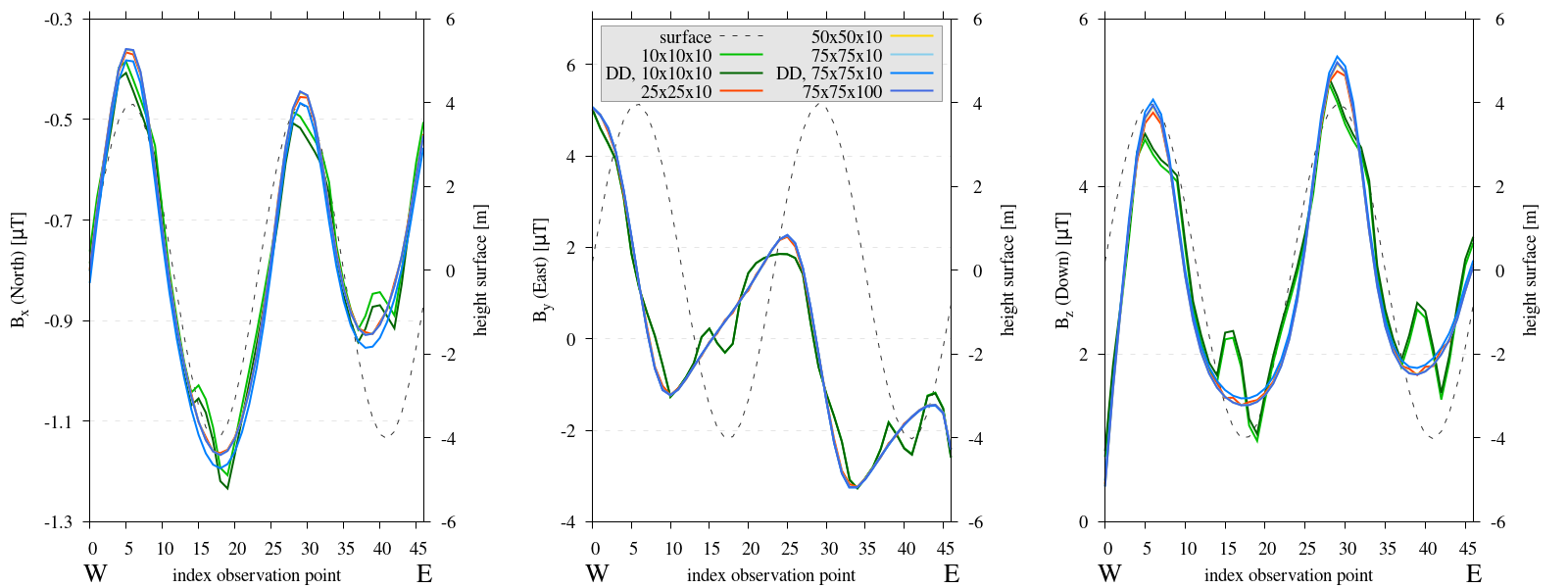
Figure 10 Three subplots depicting the components of the computed magnetic field B for the resolution experiments. The initial domain size is \(50\times50\times120m\), DD relates to extended domain depth to 240 meter, the numbers in the key relate to the amount of elements in each direction. Please note, the y-axis varies between each subplot. For an element size of \(5\times5m\), instability occurs at locations with the highest slope. An element size of \(2\times2m\) seems marginally adequate, only minor deviations occur. The amount of elements in depth does not affect results.
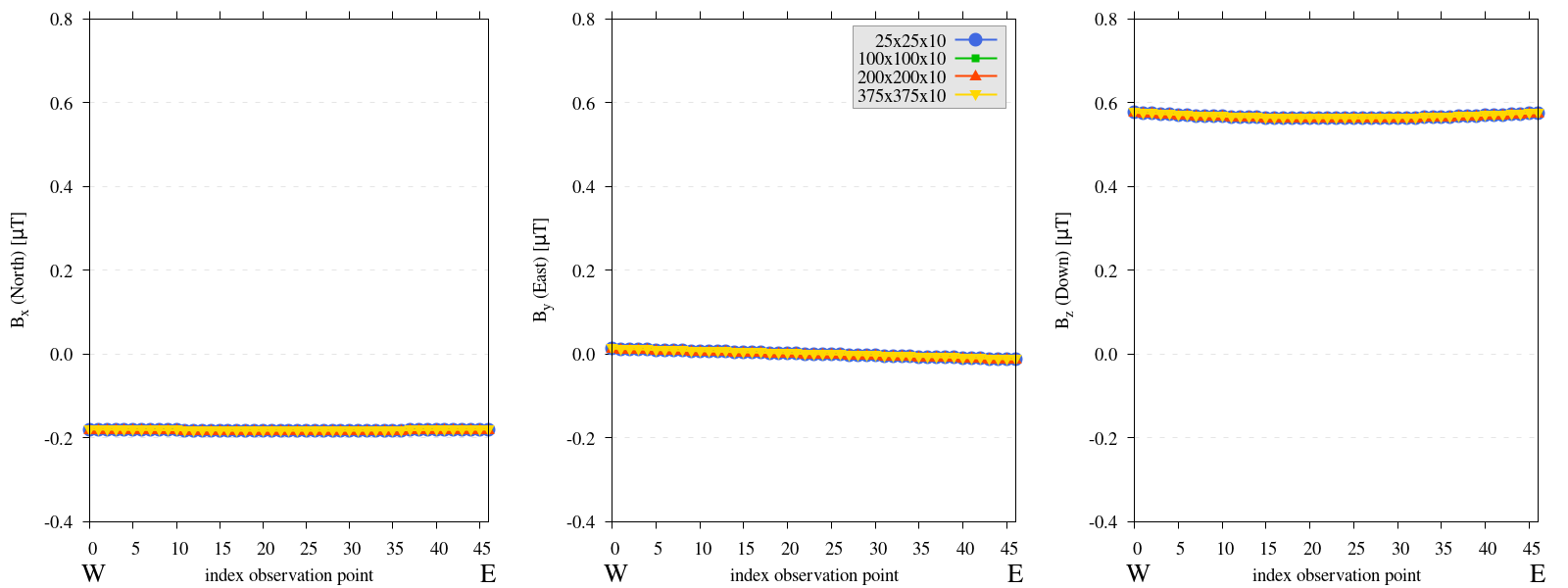
Figure 11 Three subplots depicting the components of the computed magnetic field B for the resolution experiments. The initial domain size is \(250\times250\times20m\), the numbers in the key relate to the amount of elements in each direction. The amount of elements for a flat-domain model are irrelevant.
Reproduce 1
Steps to reproduce the results and figures for zero topography
Please note basic setup in Installation.
In
MTE.py, modify benchmark attribution to2a:49benchmark = '2a'Run first setup & move files
120
121
122
123
124
125
126
127
128
129
130
131
132
133
134
135
136
137
138
139
140
141
142
143
if benchmark == '2a':
   # General settings
   remove_zerotopo = False
   compute_analytical = False
   do_spiral_measurements = False
   do_path_measurements = False

   # Domain settings
   Lx, Ly, Lz = 250, 250, 20
   nelx, nely, nelz = 25, 25, 10
   Mx0, My0, Mz0 = 0, 4.085, -6.29  # Magnetization [A/m].

   # Plane measurement settings
   do_plane_measurements = False
   plane_nnx, plane_nny = 11, 11
   plane_x0, plane_y0, plane_z0 = -Lx / 2, -Ly / 2, 1
   plane_Lx, plane_Ly = 2 * Lx, 2 * Ly

   # Line measurement settings
   do_line_measurements = True
   line_nmeas = 47
   xstart, xend = 0.23 + ((Lx - 50) / 2), 49.19 + ((Ly - 50) / 2)
   ystart, yend = Ly / 2 - 0.221, Ly / 2 - 0.221
   zstart, zend = 1, 1  # 1m above surface.
python3 -u MTE.py | tee log.txt
mkdir -p zero_topo/restest/25_25_10 && mv log.txt *.vtu *.ascii $_
Run extra setup & move files (3)
127
128
129
130
# Domain settings
Lx, Ly, Lz = 250, 250, 20
nelx, nely, nelz = 100, 100, 10
Mx0, My0, Mz0 = 0, 4.085, -6.29
127
128
129
130
# Domain settings
Lx, Ly, Lz = 250, 250, 20
nelx, nely, nelz = 200, 200, 10
Mx0, My0, Mz0 = 0, 4.085, -6.29
127
128
129
130
# Domain settings
Lx, Ly, Lz = 250, 250, 20
nelx, nely, nelz = 375, 375, 10
Mx0, My0, Mz0 = 0, 4.085, -6.29
python3 -u MTE.py | tee log.txt
mkdir -p zero_topo/restest/200_200_10 && mv log.txt *.vtu *.ascii $_
mkdir -p zero_topo/restest/375_375_10 && mv log.txt *.vtu *.ascii $_
mkdir -p zero_topo/restest/100_100_10 && mv log.txt *.vtu *.ascii $_
Go to directory & plot to visualize
cd zero_topo/
gnuplot plot_script_restest.p
Steps to reproduce the results and figures for synthetic topography
Please note basic setup in Installation.
In
MTE.py, modify benchmark attribution to5, and make sure the right setup is used:49 50 51 52 53 54 55 56 57 58 59 60 61 62 63 64 65 66 67 68 69 70
benchmark = '5' compute_vi = False # This includes the volume integral computation by Gaussian quadrature, see # documentation, possible for all setups apart from DEM (-1). if compute_vi: nqdim = 6 # Number of quadrature points, see documentation. ## ONLY BENCHMARK = -1 (DEM) & BENCHMARK = 5 (FLANKSIM) ## flat_bottom = True # If True, a flat bottom is generated at the lower surface of the domain. # Please see documentation, as the specific setup of this feature is different # for the flank simulations and the DEM test. remove_zerotopo = False # Setup run 2 times: 1st time, zero topography setup: xy coordinates # of the observation points the same, but zerotopo domain and obs path # shifted to average height DEM. 2nd time, "regular" run with topography. # final results are 2nd run - 1 st run values. Run time can be improved, # if 1st run is done with less el (and cuboid function), yet to be done. ## ONLY BENCHMARK = 5 (FLANKSIM) ## subbench = 'south' # 'south', 'east', 'north', 'west', input parameters imported from flanksim # have priority over any choice made here. So if this is used, make sure to # comment out the import line in section below! global_run = False
Run first setup & move files
231 232 233 234 235 236 237 238 239 240 241 242 243 244 245 246 247 248 249 250 251 252 253 254 255 256 257 258 259 260 261 262
if benchmark == '5': # General settings do_spiral_measurements = False do_path_measurements = False compute_analytical = False # Domain settings Lx, Ly, Lz = 50, 50, 120 nelx, nely, nelz = 10, 10, 10 Mx0, My0, Mz0 = 0, 4.085, -6.29 #Lx, Ly, Lz = 250, 250, 20 #nelx, nely, nelz = int(Lx * 1.5), int(Ly * 1.5), 10 # Synthetic topography settings wavelength = 25 A = 4 af = 6 # Line measurement settings do_line_measurements = True line_nmeas = 47 xstart, xend = 0.23 + ((Lx - 50) / 2), 49.19 + ((Ly - 50) / 2) ystart, yend = Ly / 2 - 0.221, Ly / 2 - 0.221 zstart, zend = 1, 1 # 1m above surface. # Plane measurement settings do_plane_measurements = False plane_nnx, plane_nny = 30, 30 plane_x0, plane_y0, plane_z0 = -Lx / 2, -Ly / 2, 1 plane_Lx, plane_Ly = 2 * Lx, 2 * Ly #from flanksim import *
python3 -u MTE.py | tee log.txt
mkdir -p flanksim_parameters/south/restest/10_10_10 && mv log.txt *.vtu *.ascii $_
Run extra setups & move files (6)
237 238 239 240
# Domain settings Lx, Ly, Lz = 50, 50, 240 nelx, nely, nelz = 10, 10, 10 Mx0, My0, Mz0 = 0, 4.085, -6.29
237 238 239 240
# Domain settings Lx, Ly, Lz = 50, 50, 120 nelx, nely, nelz = 25, 25, 10 Mx0, My0, Mz0 = 0, 4.085, -6.29
237 238 239 240
# Domain settings Lx, Ly, Lz = 50, 50, 120 nelx, nely, nelz = 50, 50, 10 Mx0, My0, Mz0 = 0, 4.085, -6.29
237 238 239 240
# Domain settings Lx, Ly, Lz = 50, 50, 120 nelx, nely, nelz = 75, 75, 10 Mx0, My0, Mz0 = 0, 4.085, -6.29
237 238 239 240
# Domain settings Lx, Ly, Lz = 50, 50, 120 nelx, nely, nelz = 75, 75, 100 Mx0, My0, Mz0 = 0, 4.085, -6.29
237 238 239 240
# Domain settings Lx, Ly, Lz = 50, 50, 240 nelx, nely, nelz = 75, 75, 10 Mx0, My0, Mz0 = 0, 4.085, -6.29
python3 -u MTE.py | tee log.txt
mkdir -p flanksim_parameters/south/restest/10_10_10_DD && mv log.txt *.vtu *.ascii $_
mkdir -p flanksim_parameters/south/restest/25_25_10 && mv log.txt *.vtu *.ascii $_
mkdir -p flanksim_parameters/south/restest/50_50_10 && mv log.txt *.vtu *.ascii $_
mkdir -p flanksim_parameters/south/restest/75_75_10 && mv log.txt *.vtu *.ascii $_
mkdir -p flanksim_parameters/south/restest/75_75_100 && mv log.txt *.vtu *.ascii $_
mkdir -p flanksim_parameters/south/restest/75_75_10_DD && mv log.txt *.vtu *.ascii $_
Go to directory & plot to visualize
cd flanksim_parameters/
gnuplot plot_script_restest.p
Size
Model setup
Results and analysis
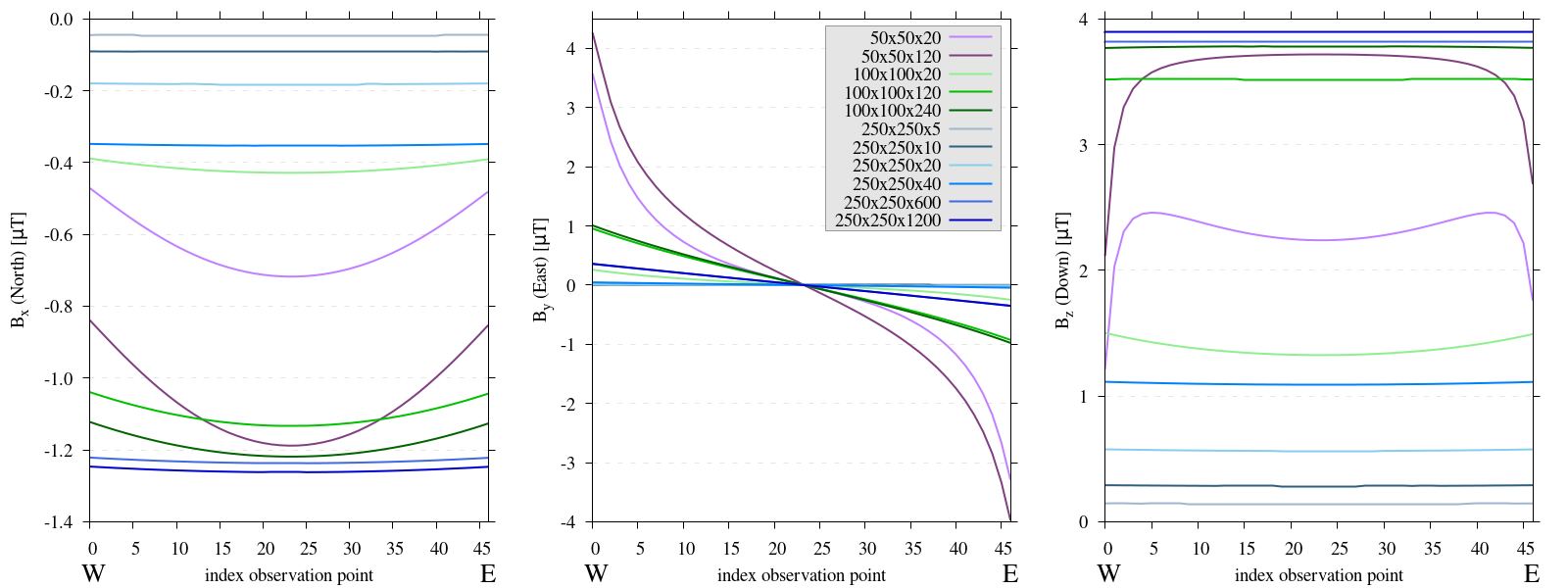
Figure 12 Three subplots depicting the components of the computed magnetic field B for the size experiments. The numbers in the key relate to the length of each side of the domain (Lx_Ly_Lz). Please note, the y-axis varies between each subplot. For domains with spatial extent below \(250\times250m\) an edge effect is observed. Additionally, a relationship between extent of the domain and magnitude of the anomaly is evident, this will be further explored in the next Figure.
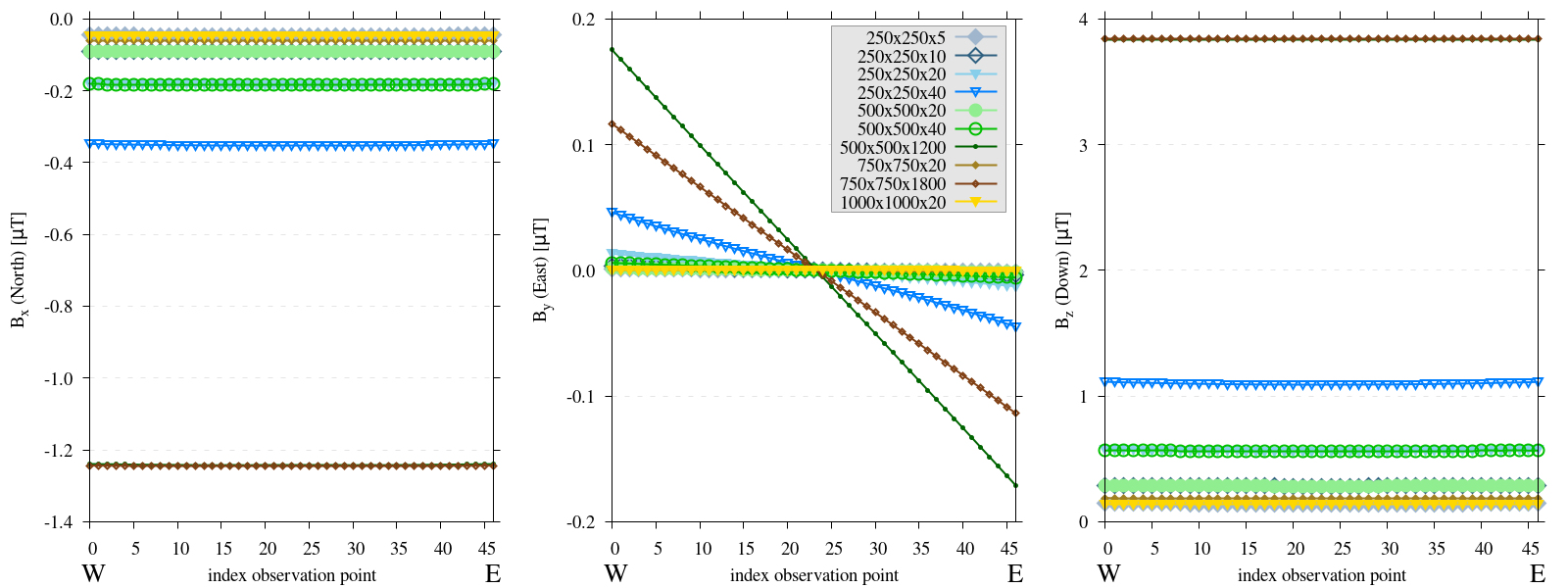
Figure 13 Three subplots depicting the components of the computed magnetic field B for the size experiments. The numbers in the key relate to the length of each side of the domain (Lx_Ly_Lz). Please note, the y-axis varies between each subplot. The relationship between extent of the domain and magnitude of the anomaly is prominently displayed, increasing depth enhances components \(B_x\) and \(B_z\) proportionally, while increasing spatial extent leads to a similarly proportional reduction of these components. Furthermore, increasing depth emphasizes the edge effect displayed.
Identical values arise when both depth and spatial extent increase equivalently (e.g., \(250\times250\times20\) and \(500\times500\times40\) meters).
Increasing spatial extent alone reduces the magnitude proportionally (e.g., \(250\times250\times20\) and \(500\times500\times20\) meters).
Increasing depth alone enhances the magnitude proportionally (e.g., \(500\times500\times20\) and \(500\times500\times40\) meters).
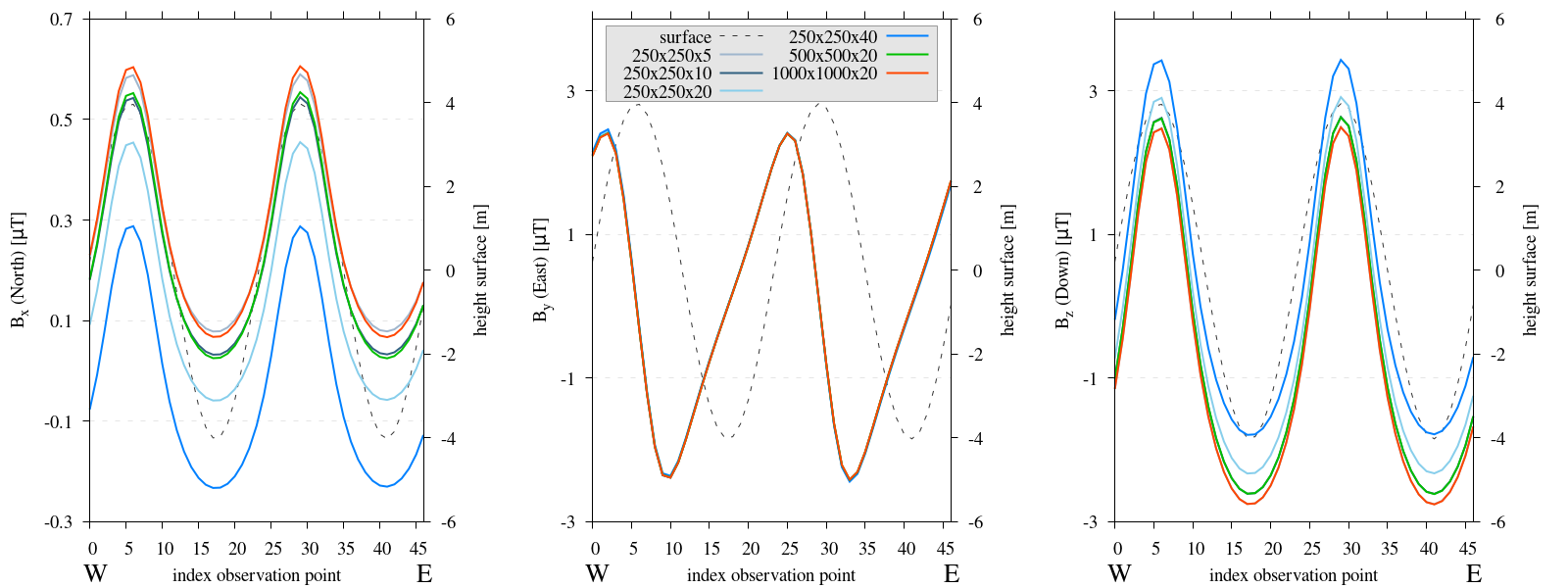
Figure 14 Three subplots depicting the components of the computed magnetic field B for the depth experiments. Size and depth of the domain are varied, the resolution and relative location (centered in the domain) of the observation path are constant. Components are rotated to align with Pmag coordinate system. The numbers in the key relate to the length of each side of the domain (Lx_Ly_Lz). Please note, the y-axis varies between each subplot. Similar trends as before are visible, spatial and depth extent proportionally influence the magnitude of the \(B_z\) and \(B_x\) components. However, for domains with a smaller depth extent, these differences are minimal compared to the anomalies produced by the topography.
Reproduce
Steps to reproduce the results and figures for zero topography
Please note basic setup in Installation.
In
MTE.py, modify benchmark attribution to2a:49benchmark = '2a'Run first setup & move files
120 121 122 123 124 125 126 127 128 129 130 131 132 133 134 135 136 137 138 139 140 141 142 143
if benchmark == '2a': # General settings remove_zerotopo = False compute_analytical = False do_spiral_measurements = False do_path_measurements = False # Domain settings Lx, Ly, Lz = 50, 50, 20 nelx, nely, nelz = int(Lx), int(Ly), 10 Mx0, My0, Mz0 = 0, 4.085, -6.29 # Magnetization [A/m]. # Plane measurement settings do_plane_measurements = False plane_nnx, plane_nny = 11, 11 plane_x0, plane_y0, plane_z0 = -Lx / 2, -Ly / 2, 1 plane_Lx, plane_Ly = 2 * Lx, 2 * Ly # Line measurement settings do_line_measurements = True line_nmeas = 47 xstart, xend = 0.23 + ((Lx - 50) / 2), 49.19 + ((Ly - 50) / 2) ystart, yend = Ly / 2 - 0.221, Ly / 2 - 0.221 zstart, zend = 1, 1 # 1m above surface.
python3 -u MTE.py | tee log.txt
mkdir -p zero_topo/50_50_20 && mv log.txt *.vtu *.ascii $_
Run extra setups & move files (16)
127 128 129 130
# Domain settings Lx, Ly, Lz = 50, 50, 120 nelx, nely, nelz = int(Lx), int(Ly), 10 Mx0, My0, Mz0 = 0, 4.085, -6.29
127 128 129 130
# Domain settings Lx, Ly, Lz = 100, 100, 20 nelx, nely, nelz = int(Lx), int(Ly), 10 Mx0, My0, Mz0 = 0, 4.085, -6.29
127 128 129 130
# Domain settings Lx, Ly, Lz = 100, 100, 120 nelx, nely, nelz = int(Lx), int(Ly), 10 Mx0, My0, Mz0 = 0, 4.085, -6.29
127 128 129 130
# Domain settings Lx, Ly, Lz = 100, 100, 240 nelx, nely, nelz = int(Lx), int(Ly), 10 Mx0, My0, Mz0 = 0, 4.085, -6.29
127 128 129 130
# Domain settings Lx, Ly, Lz = 250, 250, 5 nelx, nely, nelz = int(Lx), int(Ly), 10 Mx0, My0, Mz0 = 0, 4.085, -6.29
127 128 129 130
# Domain settings Lx, Ly, Lz = 250, 250, 10 nelx, nely, nelz = int(Lx), int(Ly), 10 Mx0, My0, Mz0 = 0, 4.085, -6.29
127 128 129 130
# Domain settings Lx, Ly, Lz = 250, 250, 20 nelx, nely, nelz = int(Lx), int(Ly), 10 Mx0, My0, Mz0 = 0, 4.085, -6.29
127 128 129 130
# Domain settings Lx, Ly, Lz = 250, 250, 40 nelx, nely, nelz = int(Lx), int(Ly), 10 Mx0, My0, Mz0 = 0, 4.085, -6.29
127 128 129 130
# Domain settings Lx, Ly, Lz = 250, 250, 600 nelx, nely, nelz = int(Lx), int(Ly), 10 Mx0, My0, Mz0 = 0, 4.085, -6.29
127 128 129 130
# Domain settings Lx, Ly, Lz = 250, 250, 1200 nelx, nely, nelz = int(Lx), int(Ly), 10 Mx0, My0, Mz0 = 0, 4.085, -6.29
127 128 129 130
# Domain settings Lx, Ly, Lz = 500, 500, 20 nelx, nely, nelz = int(Lx), int(Ly), 10 Mx0, My0, Mz0 = 0, 4.085, -6.29
127 128 129 130
# Domain settings Lx, Ly, Lz = 500, 500, 40 nelx, nely, nelz = int(Lx), int(Ly), 10 Mx0, My0, Mz0 = 0, 4.085, -6.29
127 128 129 130
# Domain settings Lx, Ly, Lz = 500, 500, 1200 nelx, nely, nelz = int(Lx), int(Ly), 10 Mx0, My0, Mz0 = 0, 4.085, -6.29
127 128 129 130
# Domain settings Lx, Ly, Lz = 750, 750, 20 nelx, nely, nelz = int(Lx), int(Ly), 10 Mx0, My0, Mz0 = 0, 4.085, -6.29
127 128 129 130
# Domain settings Lx, Ly, Lz = 750, 750, 1800 nelx, nely, nelz = int(Lx), int(Ly), 10 Mx0, My0, Mz0 = 0, 4.085, -6.29
127 128 129 130
# Domain settings Lx, Ly, Lz = 1000, 1000, 20 nelx, nely, nelz = int(Lx), int(Ly), 10 Mx0, My0, Mz0 = 0, 4.085, -6.29
Code 108 /main/ (runtime: ~20 s, ~1 min, ~1 min, ~1 min, ~7 min, ~7 min, ~7 min, ~7 min, ~7 min, ~7 min, ~30 min, ~30 min, ~30 min, ~1 hr, ~1 hr, ~2 hr)¶python3 -u MTE.py | tee log.txt
mkdir -p zero_topo/50_50_120 && mv log.txt *.vtu *.ascii $_
mkdir -p zero_topo/100_100_20 && mv log.txt *.vtu *.ascii $_
mkdir -p zero_topo/100_100_120 && mv log.txt *.vtu *.ascii $_
mkdir -p zero_topo/100_100_240 && mv log.txt *.vtu *.ascii $_
mkdir -p zero_topo/250_250_5 && mv log.txt *.vtu *.ascii $_
mkdir -p zero_topo/250_250_10 && mv log.txt *.vtu *.ascii $_
mkdir -p zero_topo/250_250_20 && mv log.txt *.vtu *.ascii $_
mkdir -p zero_topo/250_250_40 && mv log.txt *.vtu *.ascii $_
mkdir -p zero_topo/250_250_600 && mv log.txt *.vtu *.ascii $_
mkdir -p zero_topo/250_250_1200 && mv log.txt *.vtu *.ascii $_
mkdir -p zero_topo/500_500_20 && mv log.txt *.vtu *.ascii $_
mkdir -p zero_topo/500_500_40 && mv log.txt *.vtu *.ascii $_
mkdir -p zero_topo/500_500_1200 && mv log.txt *.vtu *.ascii $_
mkdir -p zero_topo/500_500_1200 && mv log.txt *.vtu *.ascii $_
mkdir -p zero_topo/750_750_1800 && mv log.txt *.vtu *.ascii $_
mkdir -p zero_topo/1000_1000_20 && mv log.txt *.vtu *.ascii $_
Go to directory & plot to visualize
cd zero_topo/
gnuplot plot_script_extest.p
Steps to reproduce the results and figures for synthetic topography
Please note basic setup in Installation.
In
MTE.py, modify benchmark attribution to5, and make sure the right setup is used:49 50 51 52 53 54 55 56 57 58 59 60 61 62 63 64 65 66 67 68 69 70
benchmark = '5' compute_vi = False # This includes the volume integral computation by Gaussian quadrature, see # documentation, possible for all setups apart from DEM (-1). if compute_vi: nqdim = 6 # Number of quadrature points, see documentation. ## ONLY BENCHMARK = -1 (DEM) & BENCHMARK = 5 (FLANKSIM) ## flat_bottom = True # If True, a flat bottom is generated at the lower surface of the domain. # Please see documentation, as the specific setup of this feature is different # for the flank simulations and the DEM test. remove_zerotopo = False # Setup run 2 times: 1st time, zero topography setup: xy coordinates # of the observation points the same, but zerotopo domain and obs path # shifted to average height DEM. 2nd time, "regular" run with topography. # final results are 2nd run - 1 st run values. Run time can be improved, # if 1st run is done with less el (and cuboid function), yet to be done. ## ONLY BENCHMARK = 5 (FLANKSIM) ## subbench = 'south' # 'south', 'east', 'north', 'west', input parameters imported from flanksim # have priority over any choice made here. So if this is used, make sure to # comment out the import line in section below! global_run = False
Run first setup & move files
231 232 233 234 235 236 237 238 239 240 241 242 243 244 245 246 247 248 249 250 251 252 253 254 255 256 257 258 259 260
if benchmark == '5': # General settings do_spiral_measurements = False do_path_measurements = False compute_analytical = False # Domain settings Lx, Ly, Lz = 250, 250, 5 nelx, nely, nelz = int(Lx * 1.5), int(Ly * 1.5), 10 Mx0, My0, Mz0 = 0, 4.085, -6.29 #Lx, Ly, Lz = 50, 50, 120 #nelx, nely, nelz = 10, 10, 10 # Synthetic topography settings wavelength = 25 A = 4 af = 6 # Line measurement settings do_line_measurements = True line_nmeas = 47 xstart, xend = 0.23 + ((Lx - 50) / 2), 49.19 + ((Ly - 50) / 2) ystart, yend = Ly / 2 - 0.221, Ly / 2 - 0.221 zstart, zend = 1, 1 # 1m above surface. # Plane measurement settings do_plane_measurements = False plane_nnx, plane_nny = 30, 30 plane_x0, plane_y0, plane_z0 = -Lx / 2, -Ly / 2, 1 plane_Lx, plane_Ly = 2 * Lx, 2 * Ly
python3 -u MTE.py | tee log.txt
mkdir -p flanksim_parameters/south/extest/250_250_5 && mv log.txt *.vtu *.ascii $_
Run extra setups & move files (5)
237 238
# Domain settings Lx, Ly, Lz = 250, 250, 10
237 238
# Domain settings Lx, Ly, Lz = 250, 250, 20
237 238
# Domain settings Lx, Ly, Lz = 250, 250, 40
237 238
# Domain settings Lx, Ly, Lz = 500, 500, 20
237 238
# Domain settings Lx, Ly, Lz = 1000, 1000, 20
python3 -u MTE.py | tee log.txt
mkdir -p flanksim_parameters/south/extest/250_250_10 && mv log.txt *.vtu *.ascii $_
mkdir -p flanksim_parameters/south/extest/250_250_20 && mv log.txt *.vtu *.ascii $_
mkdir -p flanksim_parameters/south/extest/250_250_40 && mv log.txt *.vtu *.ascii $_
mkdir -p flanksim_parameters/south/extest/500_500_20 && mv log.txt *.vtu *.ascii $_
mkdir -p flanksim_parameters/south/extest/1000_1000_20 && mv log.txt *.vtu *.ascii $_
Go to directory & plot to visualize
cd flanksim_parameters/
gnuplot plot_script_extest.p
Verification
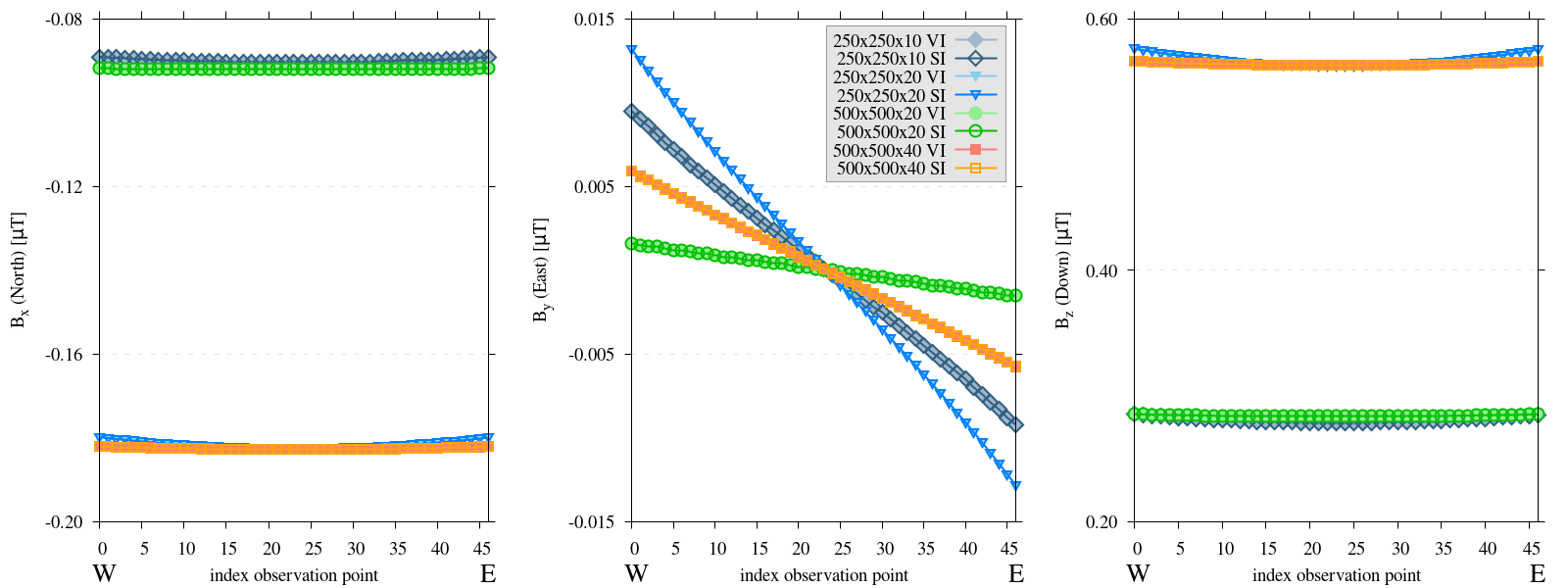
Figure 15 Three subplots depicting the components of the computed magnetic field B for flat-terrain experiments. The spatial extent of the domain is varied, while adhering the threshold resolution. The numbers in the key relate to the length of each side of the domain (Lx_Ly_Lz). Results marked ‘VI’ were derived using the volume integral method, whereas those labeled ‘SI’ were obtained via the surface integral method. Please note, the y-axis varies between each subplot. Consistently, both methods generate identical results, with the previously described trends observable in both cases.
Reproduce
Steps to reproduce the results and figures for zero topography
Please note basic setup in Installation.
In
MTE.py, modify benchmark attribution to2a:49 50 51 52 53 54
benchmark = '2a' compute_vi = True # This includes the volume integral computation by Gaussian quadrature, see # documentation, possible for all setups apart from DEM (-1). if compute_vi: nqdim = 6 # Number of quadrature points, see documentation.
Run first setup & move files
120 121 122 123 124 125 126 127 128 129 130 131 132 133 134 135 136 137 138 139 140 141 142 143
if benchmark == '2a': # General settings remove_zerotopo = False compute_analytical = False do_spiral_measurements = False do_path_measurements = False # Domain settings Lx, Ly, Lz = 250, 250, 10 nelx, nely, nelz = int(Lx), int(Ly), 10 Mx0, My0, Mz0 = 0, 4.085, -6.29 # Magnetization [A/m]. # Plane measurement settings do_plane_measurements = False plane_nnx, plane_nny = 11, 11 plane_x0, plane_y0, plane_z0 = -Lx / 2, -Ly / 2, 1 plane_Lx, plane_Ly = 2 * Lx, 2 * Ly # Line measurement settings do_line_measurements = True line_nmeas = 47 xstart, xend = 0.23 + ((Lx - 50) / 2), 49.19 + ((Ly - 50) / 2) ystart, yend = Ly / 2 - 0.221, Ly / 2 - 0.221 zstart, zend = 1, 1 # 1m above surface.
python3 -u MTE.py | tee log.txt
mkdir -p zero_topo/250_250_10_wvi && mv log.txt *.vtu *.ascii $_
Run extra setups & move files (3)
127 128 129 130
# Domain settings Lx, Ly, Lz = 250, 250, 20 nelx, nely, nelz = int(Lx), int(Ly), 10 Mx0, My0, Mz0 = 0, 4.085, -6.29
127 128 129 130
# Domain settings Lx, Ly, Lz = 500, 500, 20 nelx, nely, nelz = int(Lx), int(Ly), 10 Mx0, My0, Mz0 = 0, 4.085, -6.29
127 128 129 130
# Domain settings Lx, Ly, Lz = 500, 500, 40 nelx, nely, nelz = int(Lx), int(Ly), 10 Mx0, My0, Mz0 = 0, 4.085, -6.29
python3 -u MTE.py | tee log.txt
mkdir -p zero_topo/250_250_20_wvi && mv log.txt *.vtu *.ascii $_
mkdir -p zero_topo/500_500_20_wvi && mv log.txt *.vtu *.ascii $_
mkdir -p zero_topo/500_500_40_wvi && mv log.txt *.vtu *.ascii $_
Go to directory & plot to visualize
cd zero_topo/
gnuplot plot_script_visi.p
Challenges in Setup Optimization
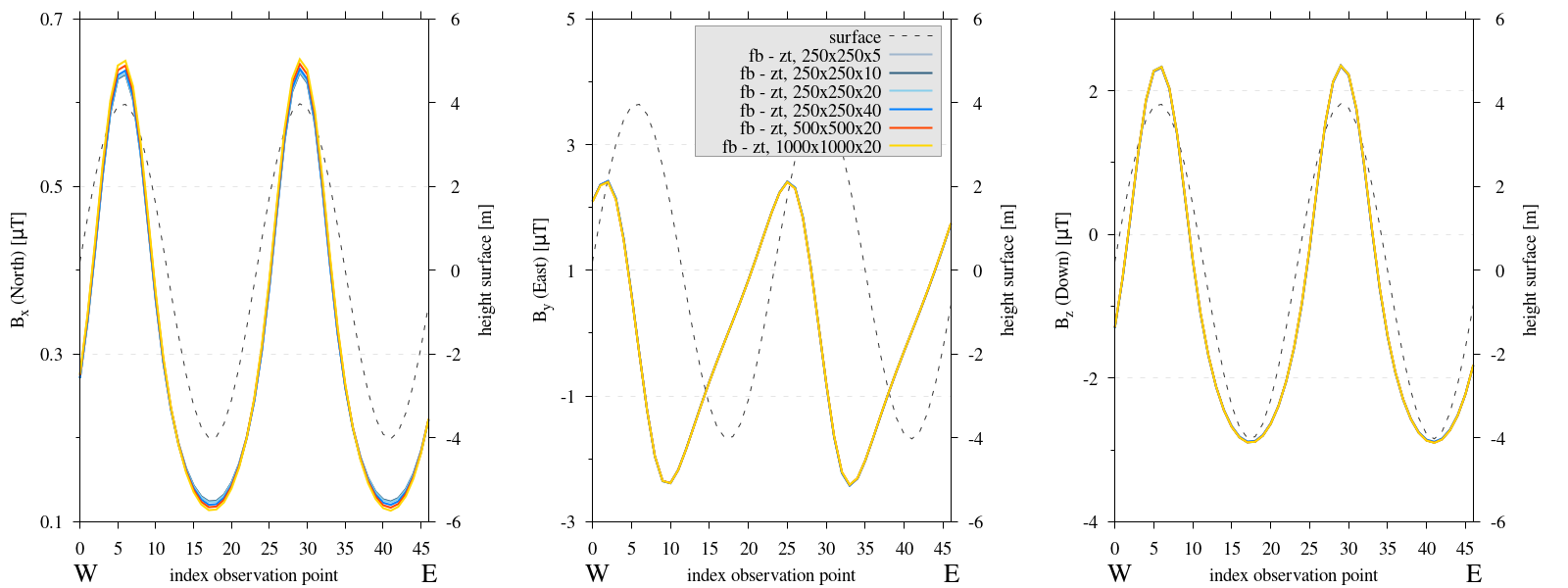
Figure 16 Three subplots depicting the components of the computed magnetic field B for the depth experiments. The numbers in the key relate to the length of each side of the domain (Lx_Ly_Lz). Please note, the y-axis varies between each subplot. Adjusting the computed values with a zero topography run removes most domain related variations, irrelevant of size and depth.
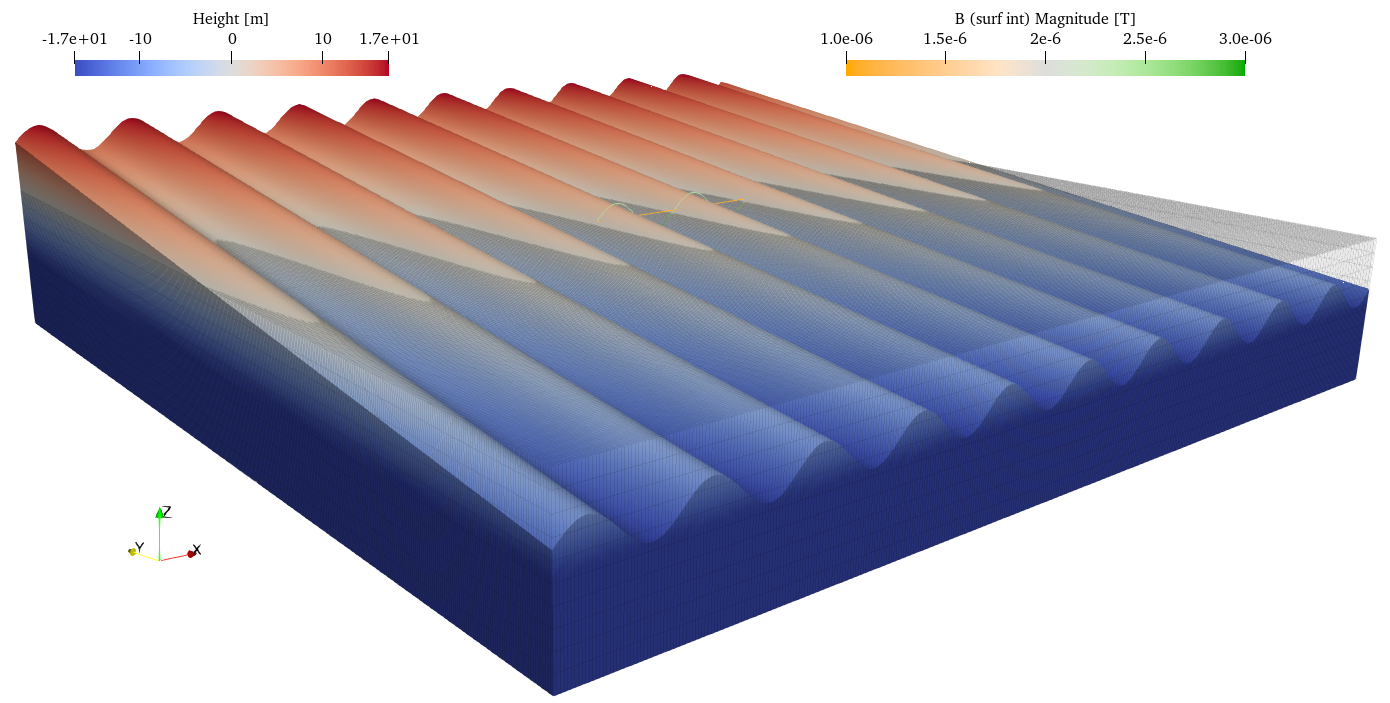
Figure 17 Visualization of Southern flank and flat-terrain model setup. The flat-terrain setup is set to a lower opacity, to show the intersection between the two domains. The observation points for both setups are at the same xy-coordinates, only the z-coordinate differs. Furthermore, the thickness of the flat-terrain domain is equal to the depth of the topography setup underneath the observation path.
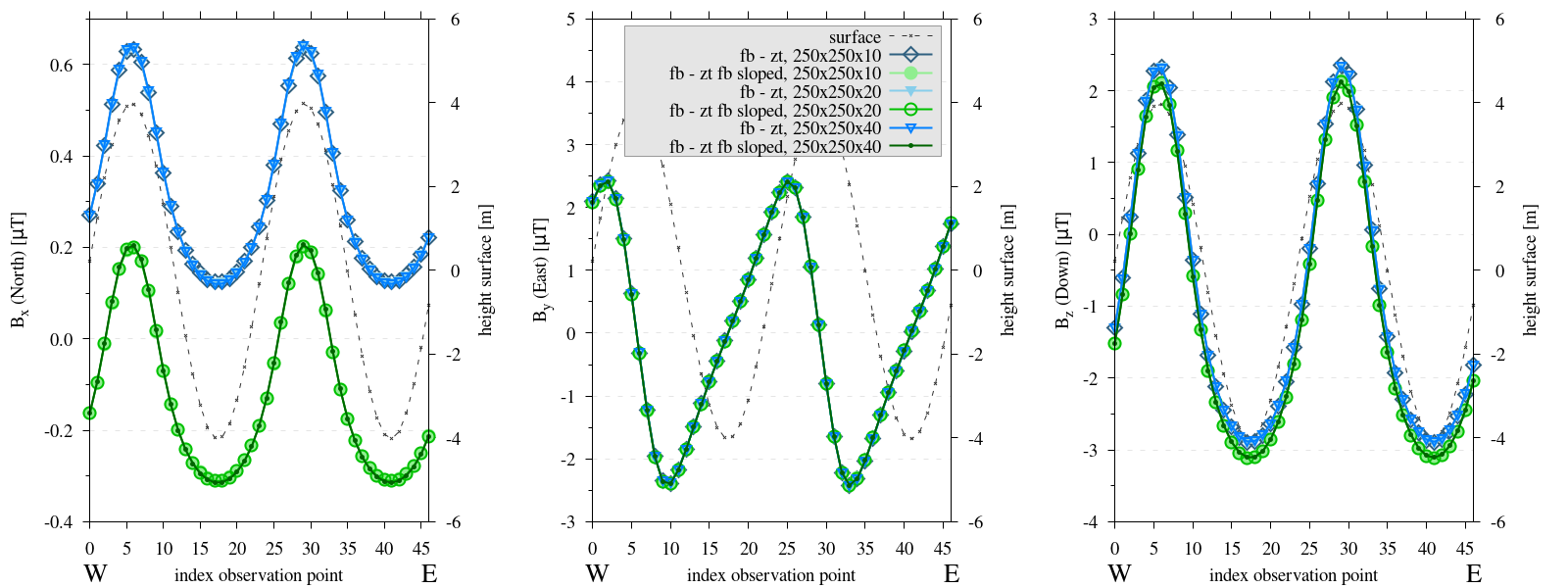
Figure 18 Three subplots depicting the components of the computed magnetic field B for the depth experiments. The numbers in the key relate to the length of each side of the domain (Lx_Ly_Lz). Please note, the y-axis varies between each subplot. Subtracting a sloped zero-topography instead of a regular flat zero-topography domain results in the \(B_x\) components to fully match. However, it is evident that the effect of the slope is also removed, as the results are approximately \(0.5 \mu T\) lower than in previous tests.
Reproduce
Steps to reproduce the results and figures for synthetic topography
Please note basic setup in Installation.
In
MTE.py, modify benchmark attribution to5, and make sure the right setup is used:49 50 51 52 53 54 55 56 57 58 59 60 61 62 63 64 65 66 67 68 69 70
benchmark = '5' compute_vi = False # This includes the volume integral computation by Gaussian quadrature, see # documentation, possible for all setups apart from DEM (-1). if compute_vi: nqdim = 6 # Number of quadrature points, see documentation. ## ONLY BENCHMARK = -1 (DEM) & BENCHMARK = 5 (FLANKSIM) ## flat_bottom = True # If True, a flat bottom is generated at the lower surface of the domain. # Please see documentation, as the specific setup of this feature is different # for the flank simulations and the DEM test. remove_zerotopo = True # Setup run 2 times: 1st time, zero topography setup: xy coordinates # of the observation points the same, but zerotopo domain and obs path # shifted to average height DEM. 2nd time, "regular" run with topography. # final results are 2nd run - 1 st run values. Run time can be improved, # if 1st run is done with less el (and cuboid function), yet to be done. ## ONLY BENCHMARK = 5 (FLANKSIM) ## subbench = 'south' # 'south', 'east', 'north', 'west', input parameters imported from flanksim # have priority over any choice made here. So if this is used, make sure to # comment out the import line in section below! global_run = False
Run first setup & move files
231 232 233 234 235 236 237 238 239 240 241 242 243 244 245 246 247 248 249 250 251 252 253 254 255 256 257 258 259 260
if benchmark == '5': # General settings do_spiral_measurements = False do_path_measurements = False compute_analytical = False # Domain settings Lx, Ly, Lz = 250, 250, 5 nelx, nely, nelz = int(Lx * 1.5), int(Ly * 1.5), 10 Mx0, My0, Mz0 = 0, 4.085, -6.29 #Lx, Ly, Lz = 50, 50, 120 #nelx, nely, nelz = 10, 10, 10 # Synthetic topography settings wavelength = 25 A = 4 af = 6 # Line measurement settings do_line_measurements = True line_nmeas = 47 xstart, xend = 0.23 + ((Lx - 50) / 2), 49.19 + ((Ly - 50) / 2) ystart, yend = Ly / 2 - 0.221, Ly / 2 - 0.221 zstart, zend = 1, 1 # 1m above surface. # Plane measurement settings do_plane_measurements = False plane_nnx, plane_nny = 30, 30 plane_x0, plane_y0, plane_z0 = -Lx / 2, -Ly / 2, 1 plane_Lx, plane_Ly = 2 * Lx, 2 * Ly
python3 -u MTE.py | tee log.txt
mkdir -p flanksim_parameters/south/ztr/250_250_5 && mv log.txt *.vtu *.ascii $_
Run extra setups & move files (5)
237 238
# Domain settings Lx, Ly, Lz = 250, 250, 10
237 238
# Domain settings Lx, Ly, Lz = 250, 250, 20
237 238
# Domain settings Lx, Ly, Lz = 250, 250, 40
237 238
# Domain settings Lx, Ly, Lz = 500, 500, 20
237 238
# Domain settings Lx, Ly, Lz = 1000, 1000, 20
python3 -u MTE.py | tee log.txt
mkdir -p flanksim_parameters/south/ztr/250_250_10 && mv log.txt *.vtu *.ascii $_
mkdir -p flanksim_parameters/south/ztr/250_250_20 && mv log.txt *.vtu *.ascii $_
mkdir -p flanksim_parameters/south/ztr/250_250_40 && mv log.txt *.vtu *.ascii $_
mkdir -p flanksim_parameters/south/ztr/500_500_20 && mv log.txt *.vtu *.ascii $_
mkdir -p flanksim_parameters/south/ztr/1000_1000_20 && mv log.txt *.vtu *.ascii $_
Run three sloped zero topography setups & move files
49
50
51
52
53
54
55
56
57
58
59
60
61
62
63
64
65
66
67
68
69
70
benchmark = '5'

compute_vi = False  # This includes the volume integral computation by Gaussian quadrature, see
                     # documentation, possible for all setups apart from DEM (-1).
if compute_vi:
   nqdim = 6  # Number of quadrature points, see documentation.

## ONLY BENCHMARK = -1 (DEM) & BENCHMARK = 5 (FLANKSIM) ##
flat_bottom = True  # If True, a flat bottom is generated at the lower surface of the domain.
                    # Please see documentation, as the specific setup of this feature is different
                    # for the flank simulations and the DEM test.
remove_zerotopo = False  # Setup run 2 times: 1st time, zero topography setup: xy coordinates
                        # of the observation points the same, but zerotopo domain and obs path
                        # shifted to average height DEM. 2nd time, "regular" run with topography.
                        # final results are 2nd run - 1 st run values. Run time can be improved,
                        # if 1st run is done with less el (and cuboid function), yet to be done.

## ONLY BENCHMARK = 5 (FLANKSIM) ##
subbench = 'south'  # 'south', 'east', 'north', 'west', input parameters imported from flanksim
                    # have priority over any choice made here. So if this is used, make sure to
                    # comment out the import line in section below!
global_run = False
237 238 239 240 241 242 243 244 245 246 247
# Domain settings Lx, Ly, Lz = 250, 250, 10 nelx, nely, nelz = int(Lx * 1.5), int(Ly * 1.5), 10 Mx0, My0, Mz0 = 0, 4.085, -6.29 #Lx, Ly, Lz = 50, 50, 120 #nelx, nely, nelz = 10, 10, 10 # Synthetic topography settings wavelength = 0 A = 0 af = 6
237 238 239 240 241 242 243 244 245 246 247
# Domain settings Lx, Ly, Lz = 250, 250, 20 nelx, nely, nelz = int(Lx * 1.5), int(Ly * 1.5), 10 Mx0, My0, Mz0 = 0, 4.085, -6.29 #Lx, Ly, Lz = 50, 50, 120 #nelx, nely, nelz = 10, 10, 10 # Synthetic topography settings wavelength = 0 A = 0 af = 6
237 238 239 240 241 242 243 244 245 246 247
# Domain settings Lx, Ly, Lz = 250, 250, 40 nelx, nely, nelz = int(Lx * 1.5), int(Ly * 1.5), 10 Mx0, My0, Mz0 = 0, 4.085, -6.29 #Lx, Ly, Lz = 50, 50, 120 #nelx, nely, nelz = 10, 10, 10 # Synthetic topography settings wavelength = 0 A = 0 af = 6
python3 -u MTE.py | tee log.txt
mkdir -p flanksim_parameters/south/ztr/250_250_10_ss && mv log.txt *.vtu *.ascii $_
mkdir -p flanksim_parameters/south/ztr/250_250_20_ss && mv log.txt *.vtu *.ascii $_
mkdir -p flanksim_parameters/south/ztr/250_250_40_ss && mv log.txt *.vtu *.ascii $_
Go to directory & plot to visualize
cd flanksim_parameters/
gnuplot plot_script_ztr.p
Bottom boundary
use the same topography as the top surface at Lx below the topography.
produce a level plane at Lz below the lowest point of the topography.
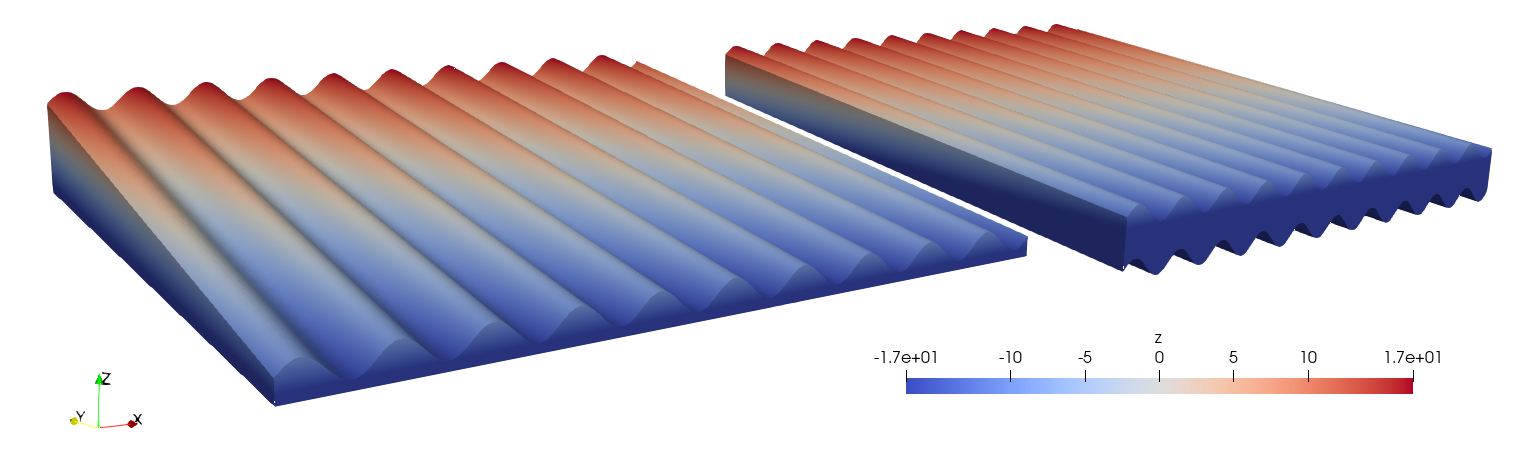
Figure 19 The resulting mesh using either the same topography as the top surface (on the right) or a flat bottom (on the left) for the setup as outlined in flank simulations.
Model setup
To compare the two methods, similar model setups as before are used. Again, testing incorporates the subtraction of a flat-terrain domain from the final results. Tests are done on domains with sizes of \(250\times250\times10\) and \(250\times250\times20\) meter, adhering previously establish tresholds for the amount of elements.
Results
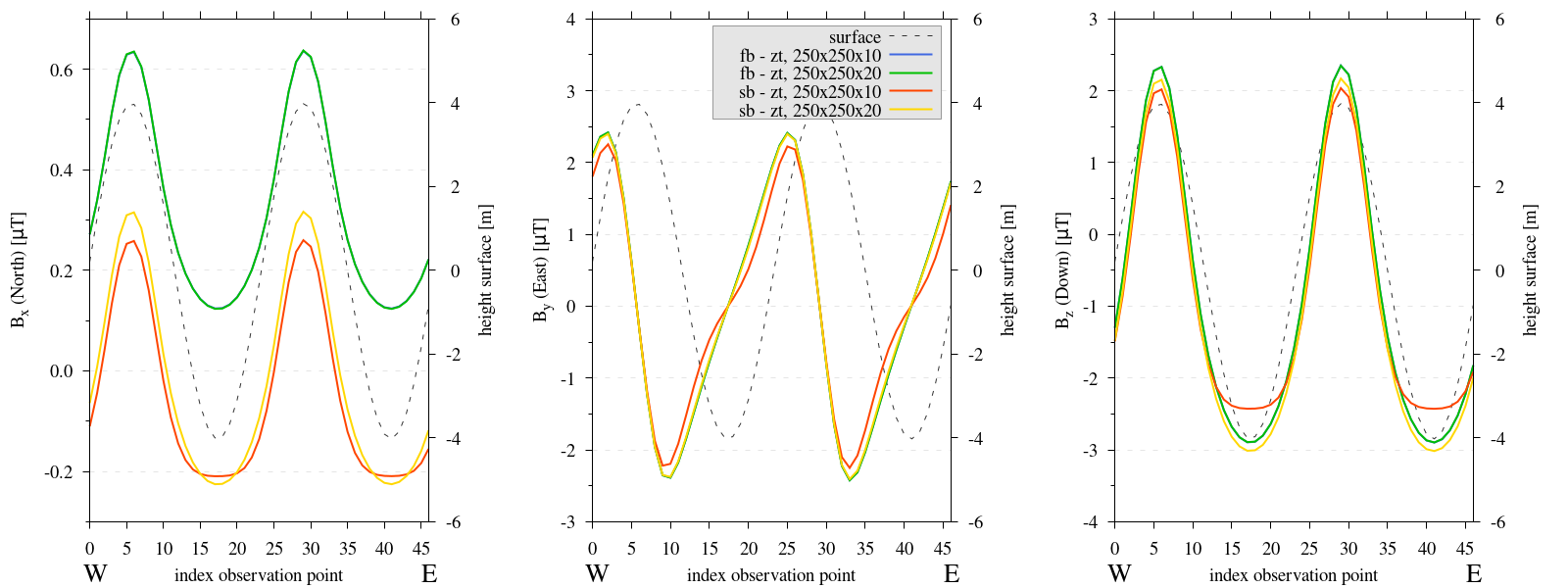
Figure 20 Three subplots depicting the components of the computed magnetic field B for the depth experiments. The numbers in the key relate to the length of each side of the domain (Lx_Ly_Lz). Please note, the y-axis varies between each subplot.
In Figure 20, we observe that the solution of subtraction a zero topography method does not produce adequate results if the same topography is used at the bottom, which is to be expected, as in this setup the bottom surface for the zero topography domain and regular run are not identical.
Reproduce
Steps to reproduce the results and figures for synthetic topography
Please note basic setup in Installation.
In
MTE.py, modify benchmark attribution to5, and make sure the right setup is used:49 50 51 52 53 54 55 56 57 58 59 60 61 62 63 64 65 66 67 68 69 70
benchmark = '5' compute_vi = False # This includes the volume integral computation by Gaussian quadrature, see # documentation, possible for all setups apart from DEM (-1). if compute_vi: nqdim = 6 # Number of quadrature points, see documentation. ## ONLY BENCHMARK = -1 (DEM) & BENCHMARK = 5 (FLANKSIM) ## flat_bottom = False # If True, a flat bottom is generated at the lower surface of the domain. # Please see documentation, as the specific setup of this feature is different # for the flank simulations and the DEM test. remove_zerotopo = True # Setup run 2 times: 1st time, zero topography setup: xy coordinates # of the observation points the same, but zerotopo domain and obs path # shifted to average height DEM. 2nd time, "regular" run with topography. # final results are 2nd run - 1 st run values. Run time can be improved, # if 1st run is done with less el (and cuboid function), yet to be done. ## ONLY BENCHMARK = 5 (FLANKSIM) ## subbench = 'south' # 'south', 'east', 'north', 'west', input parameters imported from flanksim # have priority over any choice made here. So if this is used, make sure to # comment out the import line in section below! global_run = False
Run two same bottom setups & move files (not included lines same as before)
237 238 239 240 241 242 243 244 245 246 247
# Domain settings Lx, Ly, Lz = 250, 250, 10 nelx, nely, nelz = int(Lx * 1.5), int(Ly * 1.5), 10 Mx0, My0, Mz0 = 0, 4.085, -6.29 #Lx, Ly, Lz = 50, 50, 120 #nelx, nely, nelz = 10, 10, 10 # Synthetic topography settings wavelength = 25 A = 6 af = 6
237 238 239 240 241 242 243 244 245 246 247
# Domain settings Lx, Ly, Lz = 250, 250, 20 nelx, nely, nelz = int(Lx * 1.5), int(Ly * 1.5), 10 Mx0, My0, Mz0 = 0, 4.085, -6.29 #Lx, Ly, Lz = 50, 50, 120 #nelx, nely, nelz = 10, 10, 10 # Synthetic topography settings wavelength = 25 A = 6 af = 6
python3 -u MTE.py | tee log.txt
mkdir -p flanksim_parameters/south/ztr/250_250_10_sb && mv log.txt *.vtu *.ascii $_
mkdir -p flanksim_parameters/south/ztr/250_250_20_sb && mv log.txt *.vtu *.ascii $_
Go to directory & plot to visualize
cd flanksim_parameters/
gnuplot plot_script_sb.p
Conclusions
The amount of elements in the z-direction is irrelevant and will be maintained at ten.
The amount of elements in the xy-direction for synthetic topography should be at least 1.5 elements per meter (at a height of 1 meter above the surface).
The spatial extent of the domain needs to be at least \(250\times250m\) to avoid a significant edge effect on a central measurement path (of ~:math:50m).
- Extending the depth and spatial extent has a proportional impact on the magnitude of the \(B_z\) and \(B_x\) components.
Increasing the depth for a domain leads to enlargement of the edge effect, so the depth of the domain should remain considerably less than the spatial dimension.
To remove the domain related variations, one can subtract the values computed over a flat topography domain from the observed results. We recommend implementing a flat boundary surface at a consistent depth beneath the lowest topographical point within the domain. The thickness of this “zero topography” domain should be calibrated to match that beneath the observation path within the topographic domain.
Footnotes
- 1
To avoid redundancy, in this section we outline one setup for each of tests done, if repeated tests are done with different setups, the rest of the model setups are located in side by side code snippets. To be able to fully reproduce the figures, all these setups are required.